How to use recurring transactions
Firefly III can automatically create transactions for you, if they follow a tight schedule, like every month, week or year.
This feature requires that you know how to run the cron job. If you have set up email correctly, Firefly III will automatically email you an overview of the transactions it has created.
Information for the recurring transaction
A recurring transaction needs meta-data, such as a title and a description. You must also indicate if the recurring transaction is active and whether your rules should apply. The first date the recurring transaction should fire should be a date in the future.
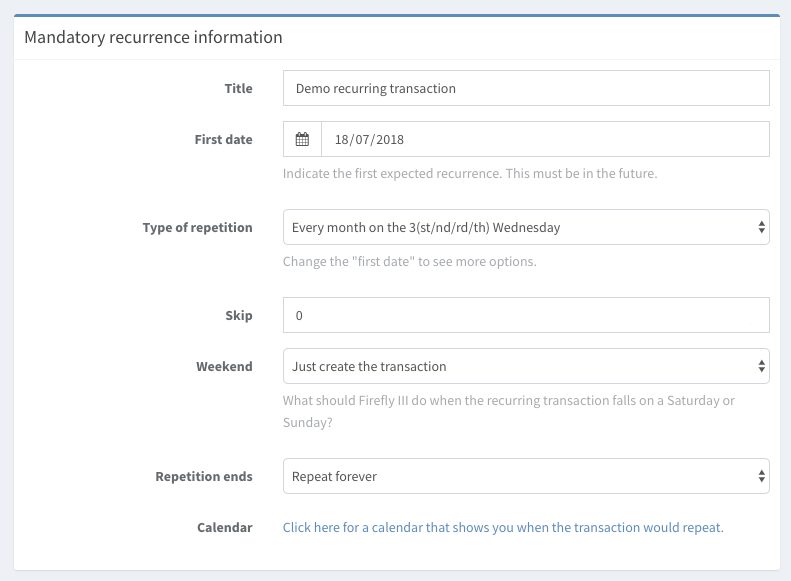
The repetition can be set to the following options:
- Every day.
- Every week on day X.
- Every month on day n (1st, 20th).
- Every month on the x-th X-day.
- Every year on a specific date.
Some notes apply:
- The x-th X-day means that Firefly III will create the transaction on the first Wednesday or the third Monday every month.
- If you create a transaction to be repeated on the 29th, 30th or 31st of the month, Firefly III will automatically fall back to the day before if the month isn't long enough.
You can make Firefly III skip every X occurrences.
If the date of the transaction should repeat is in the weekend, Firefly III can automatically:
- Skip the transaction altogether.
- Create the transaction on the Friday before instead. Please note that your recurring transaction will appear to fire a day early.
- Create the transaction on the Monday after instead. Please note that your recurring transaction will appear to fire a day late.
- Create the transaction in the weekend.
Information for the transaction itself
These are all the fields you would expect in normal transactions:
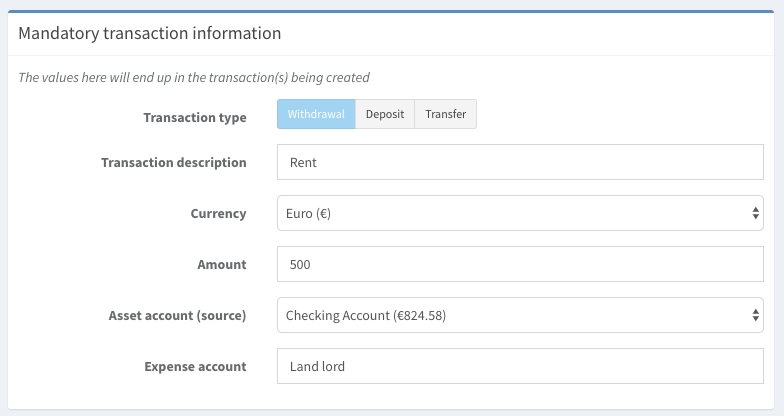
- The type of transaction.
- The description, the amount (and currency), and the source and destination accounts.
Optional information includes:
- The foreign currency and amount, if you want to.
- The category, budget, piggy bank and tags.
If you wish to link a subscription to the transaction, ensure the option to apply rules is checked and that the new transaction would match this rule.
Limitations
- You can't add a dynamic amount to a recurring transaction.
- You can't create split transactions.