API
See also:
Firefly III features a JSON API.
Please visit the dedicated Swagger documentation where you can read and try the API. A PHP library was developed by StanSoft.BG Ltd. that you can use to talk to Firefly III in PHP.
The API is slated to become the only way to talk to Firefly III: even the UI would use the API exclusively. Alas, this is a work in progress.
Developing with the Firefly III API
If you want to keep up with changes to the Firefly III API, be sure to sign up to the Firefly III dev mailing list. It's free and low-frequency.
Currencies in the API
All objects where currency is relevant have currency_* attributes. They refer to the currency set in the object. Most objects (accounts, transactions, etc.) carry their own currency settings. For example, a bill or a piggy bank has its own currency, regardless of the primary currency of the administration. Expect something like this:
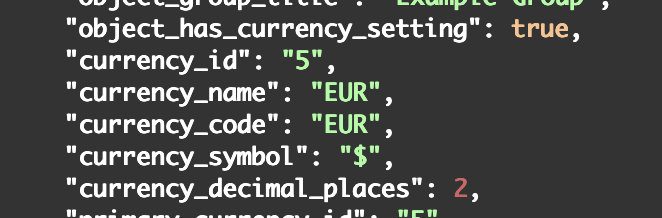
Also visible is the object_has_currency_setting setting which confirms this particular object has its own currency setting. This is true for most objects, such as accounts, transactions, bills, budgets, etc. However, some objects do not have their own currency setting, such as categories or tags. In those cases, the object_has_currency_setting will be false.
All objects where currency is relevant have primary_currency_* attributes. These refer to the primary currency of the financial administration. They may be different from the currency set in the object. For example, a transaction may be in USD, but the primary currency is EUR. This is important for conversions and exchange rates.
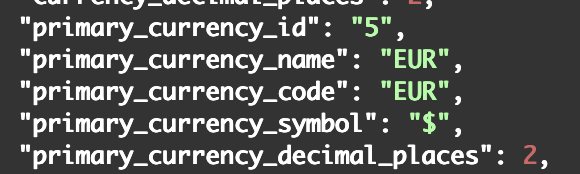
Amounts, balances and collections of expenses (such as spent or earned arrays) will always be in the currency of the associated object. For example, a transaction in USD will have amounts in USD, even when the primary currency is EUR. The API also returns all of these fields as pc_* attributes. These are the "converted to primary currency" attributes. If the user enables "convert to primary", these fields will contain the amounts converted to the primary currency of the financial administration, using the exchange rate set in Firefly III.
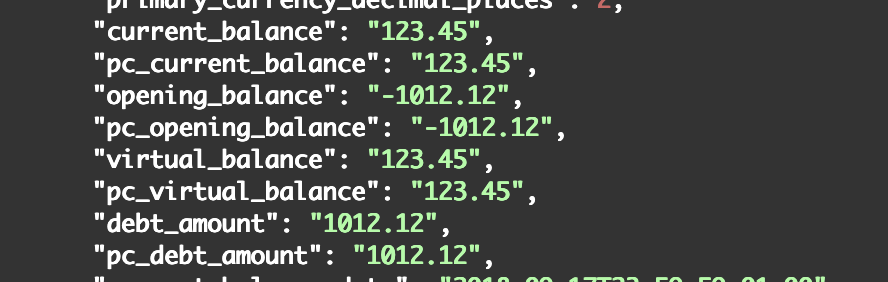
If the user does NOT enable "convert to primary", all pc_* attributes will be null. This means that the API will not convert amounts to the primary currency. If the currency of the object is the same as the primary currency, the pc_* attributes will be the same as the regular attributes. For example, a transaction in EUR with a primary currency of EUR will have amount and pc_amount set to the same value.
Configuration values
The endpoint /api/v1/configuration returns a variety of static and dynamic configuration values of Firefly III.
There are two sets of configuration values that you can retrieve through this endpoint.
- Static values. You cannot edit these. The source code of Firefly III has the full list of options.
- Dynamic values. These can be changed. The source code of Firefly III has the full list of options.
Webhooks
Firefly III supports webhooks, which you can read more about on the page about webhooks.
A webhook needs a title and a URL to work, and three important things.
- A set of triggers. Use
GET api/v1/configuration/webhook.triggersto get the available values, because they may change in the future. - A response. Use
GET api/v1/configuration/webhook.responsesto see what is available. New responses may be added in the future. - A delivery format. Use
GET api/v1/configuration/webhook.deliveriesto see what is available. This is onlyJSONright now.
When you create a webhook you can choose webhook-specific data to be the response. For example, you trigger your webhook on the creation of a new transaction, and the response is the transaction details.
However, when you create a webhook that ALSO triggers on the creation of a new budget, you cannot set the transaction details as the expected response. In that case, you must select the option "The relevant details" (RELEVANT) which will automatically select the correct data to send as response.
The reason this is complicated is that some webhook triggers come with multiple possible responses, so it is always up to you to select what you need. However, for some trigger combinations RELEVANT is the only possible response.
Differences between versions
I've not always kept a log of all changes between API versions, but for v6.4.0 onwards this is done in the diff files listed below.